Snowflake Import
The snowflake-import command uses a Snowflake STREAM object to track changes (CDC) to a table and read them into a Redis data structure like hash or json.
The Snowflake STREAM is created and managed by RIOTX.
The user credentials you provide must have the ability to create a stream in the database and schema specified by the fully qualified object name.
RIOT-X optimizes stream polling by using Snowflake’s SYSTEM$STREAM_HAS_DATA function to check if the stream contains new data before creating expensive temporary tables.
This reduces unnecessary processing and improves performance when no changes are available.
-
Snowflake Stream: A stream named
SAMPLE_DATABASE.SAMPLE_SCHEMA.DATA_TABLE_changestreamwill be created or replaced. The stream follows the naming pattern<DATABASE>.<SCHEMA>.<TABLE>_changestream. For security, this can be created in a different schema than the table you are importing from by specifying--cdc-schema. The stream is automatically managed by RIOT-X and will be recreated if deleted. -
Offset Tracking: A key named
riotx:offset:SAMPLE_DATABASE.SAMPLE_SCHEMA.DATA_TABLE_changestreamwill be stored in the destination Redis database to track the stream offset. If RIOT-X fails during data copying, it will resume from this offset when restarted. Removing this offset key from Redis will cause RIOT-X to recreate the stream at time "NOW". With--snapshot INITIAL(default), the stream will include the initial table data plus changes going forward. If you do not want initial table data to be included, specify--snapshot NEVER. -
Supported Objects:
snowflake-importcurrently works on standard tables
The basic usage is:
riotx snowflake-import [TABLE] [OPTIONS] [REDIS COMMAND...]The recommended minimal necessary permissions for a snowflake role and user to run this command are:
CREATE OR REPLACE ROLE riotx_cdc
COMMENT = 'minimum cdc role for riotx';

-- replace compute_wh with the name of the warehouse you want to use
GRANT USAGE, OPERATE ON WAREHOUSE compute_wh TO ROLE riotx_cdc;

-- replace tb_101.raw_pos_cdc with the name of a database and schema for {page-component-title} to create the stream in
CREATE OR REPLACE SCHEMA tb_101.raw_pos_cdc;
GRANT USAGE ON SCHEMA tb_101.raw_pos_cdc TO ROLE riotx_cdc;

-- replace tb_101 with the name of the database {page-component-title} needs to read out of
GRANT USAGE ON DATABASE tb_101 TO ROLE riotx_cdc;

-- replace tb_101.raw_pos with the name of the schema {page-component-title} needs to read out of
GRANT USAGE ON SCHEMA tb_101.raw_pos TO ROLE riotx_cdc;

-- replace with the name of the table(s) you want to read from
GRANT SELECT ON TABLE tb_101.raw_pos.incremental_order_header TO ROLE riotx_cdc;
GRANT REFERENCE_USAGE ON TABLE tb_101.raw_pos.incremental_order_header TO ROLE riotx_cdc;
ALTER TABLE tb_101.raw_pos.INCREMENTAL_ORDER_HEADER SET CHANGE_TRACKING = TRUE;

GRANT SELECT ON FUTURE TABLES IN SCHEMA tb_101.raw_pos_cdc TO ROLE riotx_cdc;
GRANT CREATE TABLE ON SCHEMA tb_101.raw_pos_cdc TO ROLE riotx_cdc;
GRANT CREATE STREAM ON SCHEMA tb_101.raw_pos_cdc TO ROLE riotx_cdc;
GRANT SELECT ON FUTURE STREAMS IN SCHEMA tb_101.raw_pos_cdc TO ROLE riotx_cdc;

CREATE OR REPLACE USER riotx_cdc
    DEFAULT_ROLE = 'riotx_cdc'
    DEFAULT_WAREHOUSE = 'compute_wh'
    PASSWORD = '{{PASSWORD}}';

GRANT ROLE riotx_cdc TO USER riotx_cdc;
For the full usage, run:
riotx snowflake-import --helpThis command uses the example db, schema and table names from the minimal role setup above.
riotx snowflake-import \
      tb_101.raw_pos.incremental_order_header \
      --role riotx_cdc \
      --warehouse compute_wh \
      --cdc-schema raw_pos_cdc \
      --jdbc-url "jdbc:snowflake://abcdefg.abc12345.snowflakecomputing.com" \
      --jdbc-user databaseuser \
      --jdbc-pass databasepassword \
      --poll 10s \ (1)
hset orderheader:#{order_id} (2)| 1 | Sleep 10 seconds after each CDC import |
| 2 | Column name to use as id |
The command above imports CDC data from the Snowflake table tb_101.raw_pos.incremental_order_header into Redis hashes in the keyspace orderheader.
When snowflake-import runs in direct Redis command mode, source row deletes remove the computed Redis key for key-oriented materializations such as hset, set, json.set, and del.
For example, deleting the source row with ORDER_ID=123 removes the Redis key orderheader:123.
Direct CDC delete handling supports these command combinations:
-
Primary key-oriented writes:
hset,set,json.set,del -
Optional auxiliary commands:
expire,log
Commands such as sadd, xadd, zadd, geoadd, lpush, rpush, ts.add, sugadd, search, and aggregate are rejected at startup because Snowflake row deletes do not have a safe default inverse for those operations.
You can specify multiple tables to import. If you need to reference table information in the operation you can use the #table variable which exposes name, database, and schema fields.
|
riotx snowflake-import \
      db1.public.table1 db1.public.table2 \ (1)
      ...
hset #{#table.name}:{id} (2)| 1 | Specify all tables to import |
| 2 | Use table name as key prefix |
This command would generate keys table1:abc, table2:def, etc.
CDC Event Keys and Column Projection
When snowflake-import emits CDC events to Redis streams, each event contains a key document and row payload documents such as after and before.
Use --table-keys TABLE:COL1,COL2 to select the event key columns per table and --table-columns TABLE:COL1,COL2 to limit the projected row columns per table.
The event key resolution order is:
-
--table-keys -
deprecated
--key-column -
Snowflake primary key metadata
-
full row fallback when no key columns are available
The legacy --key-column option is still supported as a global fallback for all tables in the command, but it is deprecated.
Prefer --table-keys for new configurations.
--table-keys and --key-column only control the CDC event key in stream output mode.
They do not change the Redis key template used by direct commands such as hset order:#{order_id} or json.set order:#{order_id}.
|
Configured --table-keys and --table-columns values are validated before processing starts.
If any configured column does not exist on its table, the job fails immediately with an error instead of starting CDC consumption with a bad configuration.
--table-columns is applied in the Snowflake temp table and read path, not only after rows are read.
This reduces payload size and avoids reading unnecessary columns.
If key columns are required for CDC event generation, they are automatically included in the projection even when they are not listed explicitly.
riotx snowflake-import \
      tb_101.raw_pos.orders tb_101.raw_pos.customers \
      --gen order_id customer_id status email \
      --count 123 \
      --table-keys tb_101.raw_pos.orders:order_id \
      --table-keys tb_101.raw_pos.customers:email \
      --table-columns tb_101.raw_pos.orders:order_id,customer_id,status \
--table-columns tb_101.raw_pos.customers:email,customer_idriotx snowflake-import \
db1.public.orders db1.public.customers \
--table-columns db1.public.orders:id,customer_id,total \
--table-columns db1.public.customers:id,email,name \
...
hset #{#table.name}:#{id}If you only need to do a one time import of data from Snowflake you can use the db-import command.
This command will read all of the rows output from your SQL query and will write them to Redis.
For more information see the db-import command.
riotx db-import \
      "SELECT * FROM SAMPLE_DATABASE.SAMPLE_SCHEMA.DATA_TABLE" \
      --jdbc-url "jdbc:snowflake://abcdefg.abc12345.snowflakecomputing.com" \
      --jdbc-driver net.snowflake.client.jdbc.SnowflakeDriver \
      --jdbc-user databaseuser \
      --jdbc-pass databasepassword \
hset datatable:#{data_id} (1)| 1 | Column name to use as id |
This command performs a one-time import from Snowflake using the db-import command.
RDI Integration
This recipe contains step-by-step instructions for using RIOT-X as an external collector for Redis Data Integration (RDI).
Here is the end-to-end data flow:
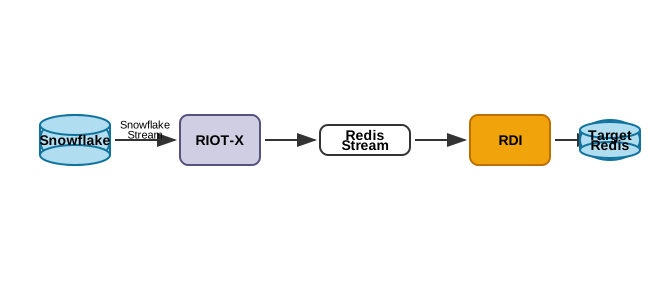
Snowflake
In your Snowflake UI (Snowsight) import this notebook: snowflake-cdc.ipynb. Run the first 2 steps in the notebook:
init
|
Set up roles, permissions and schema |
populate
|
Create and populate table |
| Do not run the other steps yet. These are for later. |
RDI
In Redis Insight use these pipeline config and job definitions:
sources:
  riotx:
    type: external
    # Redis Insight requires a connection element but it's not actually used by RDI
    connection: {}

targets:
  target:
    connection:
      type: redis
      host: # Target database hostname
      port: # Target database port
processors:source:
table: incremental_order_header
output:
- uses: redis.write
with:
connection: target
data_type: hash
key:
expression: concat(['order:', ORDER_ID])
language: jmespathSource Name
RDI matches a change record to a job by the record’s source name, which a job declares as
source.server_name. RIOT-X reports rdi unless you pass --source-name.
In a pipeline with more than one source, set --source-name to the RDI source name so records from
each source reach that source’s jobs:
riotx snowflake-import ... --source-name my_snowflake_source| The source name is also part of each offset hash field, so changing it makes RIOT-X restart from a fresh offset for the affected tables. |
Stream Key
RIOT-X writes change events to <stream-prefix><schema>.<table>. The default prefix is
data:, producing keys such as data:PUBLIC.ORDERS.
Use --stream-prefix (or RIOT_STREAM_PREFIX) to override it.
Offset Key
When writing change events to Redis Streams, --offset-key (or RIOT_OFFSET_KEY) selects the Redis
hash used for all offset reads, writes, and clears. Its default is metadata:riotx:offsets.
For multiple sources sharing a Redis database, pass a distinct key for each source.
Direct-to-Redis import mode instead uses --offset-prefix to select per-table offset keys.
RIOT-X
Run this command to start RIOT-X:
riotx snowflake-import -h <target_host> -p <target_port> tb_101.raw_pos.incremental_order_header --role riotx_cdc --warehouse compute_wh --cdc-schema raw_pos_cdc --jdbc-url "jdbc:snowflake://<account>.snowflakecomputing.com" --jdbc-user $JDBC_USER --jdbc-pass $JDBC_PASSRIOT-X will perform initial load of the incremental_order_header table which should translate to 1000 hashes in the target Redis database.
Snowflake Additional Data
Go back to your Snowflake UI and run the last step in the notebook.
This will insert 100 rows in the incremental_order_header table which will be picked up by RIOT and written to the target database.
You should now have 1,100 hashes in the target Redis database.
Service User
If your Snowflake account does not let you use JDBC password authentication you will have to use key-based authentication.
- Key Pair
-
If you don’t already have a private/public key pair you need to generate one. Follow the steps at docs.snowflake.com/en/user-guide/key-pair-auth.
Use the following command to extract the actual public key for the last step: Assign the public key to a Snowflake user
grep -v "BEGIN\|END" rsa_key.pub | tr -d '\n' - JDBC URL
-
When using key authentication you need to modify the JDBC URL to:
jdbc:snowflake://<account>.snowflakecomputing.com?private_key_file=<path_to_key>/rsa_key.p8
Performance Tuning
The snowflake-import command can be tuned for higher throughput using several options.
Key Options
| Option | Description | Default |
|---|---|---|
|
Number of rows to fetch from Snowflake per query |
Driver default |
|
Number of items per Redis write batch |
50 |
|
Number of concurrent writer threads. CDC imports require |
1 |
|
Max number of Redis connections |
8 |
Benchmark Results
The following benchmarks were performed importing data from a Snowflake table to a local Redis instance.
Results may vary based on network latency, Snowflake warehouse size, and Redis configuration.
Results from configurations that used the now-unsupported --threads 4 setting have been omitted.
| Configuration | Peak Throughput | Total Time | Improvement |
|---|---|---|---|
Defaults ( |
12,496/s |
9s |
baseline |
|
14,238/s |
8s |
+14% |
| Redis Command | Peak Throughput | Total Time |
|---|---|---|
|
57,025/s |
18s |
|
49,979/s |
21s |
Recommended Settings
For high-throughput imports, use:
riotx snowflake-import \
      tb_101.raw_pos.incremental_order_header \
      --jdbc-url "jdbc:snowflake://account.snowflakecomputing.com" \
      --jdbc-user user \
      --warehouse COMPUTE_WH \
      --cdc-schema raw_pos_cdc \
      --fetch 5000 \
      --batch 500 \
      hset orderheader:#{order_id}
Tuning Guidelines
-
--fetch: Larger values reduce Snowflake round-trips but increase memory usage. Values between 1000-5000 work well. -
--batch: Larger batches improve Redis throughput but too large (2000+) can cause diminishing returns. -
--threads: Must remain1so chunks from the same table are processed and checkpointed in order. When multiple tables are configured, RIOT-X still processes them in parallel using one ordered flow per table. -
--pool: Controls the Redis connection pool. Size it for the number of table flows rather than increasing--threads.
For initial load benchmarks, use --offset-clear to reset the stream offset and get accurate measurements.
|
RDI End-to-End Benchmarks
When using RIOTX as an RDI collector, the end-to-end throughput includes both RIOTX ingestion and RDI processor stages.
Snowflake Table → RIOTX Collector → Redis Stream → RDI Processor → Target Redis (Hashes)Test Environment
-
Platform: Docker Desktop Kubernetes (macOS, Apple Silicon)
-
Redis Enterprise: 7.22.0-17
-
Snowflake: Standard account (TPC-H sample data)
-
RIOTX Collector: 1600Mi memory limit
Pipeline Configuration
The following config.yaml was used for the benchmarks:
sources:
  snowflake:
    type: riotx
    connection:
      type: snowflake
      url: "jdbc:snowflake://<account>.snowflakecomputing.com/"
      username: <username>
      privateKey:
        content: "<base64-encoded-private-key>"
      database: RDI_TEST
      schema: PUBLIC
      warehouse: COMPUTE_WH
    tables:
      RDI_TEST.PUBLIC.BENCHMARK_ORDERS_300K: {}
    advanced:
      riotx:
        poll: "10s"          (1)
        snapshot: INITIAL    (2)
        streamPrefix: "data:" (3)
        streamLimit: 200000  (4)
        clearOffset: true    (5)

targets:
  target:
    connection:
      type: redis
      host: target-db.redis.svc.cluster.local
      port: 12000
      password: <password>

processors:
target_data_type: hash (6)| 1 | Poll interval for CDC changes after initial snapshot |
| 2 | INITIAL includes existing table data; NEVER starts from current point |
| 3 | Prefix for Redis stream keys (e.g., data:PUBLIC.BENCHMARK_ORDERS_300K) |
| 4 | Maximum stream backlog before backpressure throttles ingestion |
| 5 | Clear offset on startup to re-process from beginning (for benchmarking) |
| 6 | Default data type when no job file matches |
Snowflake Stream Setup
Create a Snowflake stream with SHOW_INITIAL_ROWS to include existing data:
-- Create benchmark table from TPC-H sample data
CREATE OR REPLACE TABLE RDI_TEST.PUBLIC.BENCHMARK_ORDERS_300K AS
SELECT * FROM SNOWFLAKE_SAMPLE_DATA.TPCH_SF1.ORDERS
LIMIT 300000;

-- Create stream for CDC (includes initial rows)
CREATE OR REPLACE STREAM RDI_TEST.PUBLIC.BENCHMARK_ORDERS_300K_STREAM
ON TABLE RDI_TEST.PUBLIC.BENCHMARK_ORDERS_300K
SHOW_INITIAL_ROWS = TRUE;
Baseline Results (No Transformations)
With passthrough pipeline (no job file, uses target_data_type: hash):
| Dataset | Records | Duration | Throughput | Notes |
|---|---|---|---|---|
TPC-H Customers |
150,000 |
19.5s |
7,681/s |
200 bytes avg per record |
TPC-H Orders |
300,000 |
25s |
12,000/s |
150 bytes avg per record |
TPC-H Orders (1M) |
742,000 |
38s |
~19,500/s |
Memory limited at 500MB |
Results With Transformations
Adding RDI job transformations impacts throughput.
The following test used 9 rename_field operations and a JMESPath key expression:
source:
  server_name: rdi
  schema: PUBLIC
  table: BENCHMARK_ORDERS_300K
  row_format: full
transform:
  - uses: rename_field
    with:
      from_field: after.O_ORDERKEY
      to_field: after.orderkey
  - uses: rename_field
    with:
      from_field: after.O_CUSTKEY
      to_field: after.custkey
  - uses: rename_field
    with:
      from_field: after.O_ORDERSTATUS
      to_field: after.orderstatus
  - uses: rename_field
    with:
      from_field: after.O_TOTALPRICE
      to_field: after.totalprice
  - uses: rename_field
    with:
      from_field: after.O_ORDERDATE
      to_field: after.orderdate
  - uses: rename_field
    with:
      from_field: after.O_ORDERPRIORITY
      to_field: after.orderpriority
  - uses: rename_field
    with:
      from_field: after.O_CLERK
      to_field: after.clerk
  - uses: rename_field
    with:
      from_field: after.O_SHIPPRIORITY
      to_field: after.shippriority
  - uses: rename_field
    with:
      from_field: after.O_COMMENT
      to_field: after.comment
output:
  - uses: redis.write
    with:
      connection: target
      key:
        expression: "concat(['order:', to_string(after.orderkey)])"
        language: jmespath
data_type: hash| Configuration | Records | Duration | Throughput |
|---|---|---|---|
No transformations |
300,000 |
25s |
12,000/s |
With transformations (9 renames + JMESPath) |
300,000 |
35s |
8,571/s |
| Adding transformations reduced throughput by ~29%. More complex transformations (filters, aggregations) may have additional impact. |
Component Analysis
Analysis of the 1M records test shows RIOTX is not the bottleneck:
| Component | Rate | Notes |
|---|---|---|
RIOTX Collector |
30-40K/s |
Peak rate before backpressure |
RDI Processor |
18-20K/s |
Bottleneck - limited end-to-end throughput |
End-to-End |
~19,500/s |
Limited by processor consumption |
RIOTX can achieve 50K+ records/s when writing directly to Redis (see Performance Tuning benchmarks above). In the RDI pipeline, backpressure from the streamLimit setting throttles RIOTX when the processor cannot keep up.
|
RDI Operator Helm Configuration
The following Helm values enable the RIOTX collector in the RDI operator:
dataPlane:
  riotxCollector:
    enabled: true
    global:
      image:
        registry: <your-registry>
        repository: redis
        tag: <version>
    riotx:
      resources:
        limits:
          memory: 1600Mi
        requests:
          memory: 512Mi
Monitoring Commands
Monitor benchmark progress with these commands:
# Check stream statistics (entries added, backlog)
redis-cli -p <rdi-port> -a <password> \
  XINFO STREAM "data:PUBLIC.BENCHMARK_ORDERS_300K"

# Check processor statistics
redis-cli -p <rdi-port> -a <password> \
  HGETALL "statistics:{data:PUBLIC.BENCHMARK_ORDERS_300K}"

# Check target key count
redis-cli -p <target-port> -a <password> DBSIZE

# Check target memory usage
redis-cli -p <target-port> -a <password> INFO memory
Key Findings
-
RIOTX scales well: RIOTX achieved 30-40K records/s ingestion rate, limited only by downstream backpressure.
-
Processor is the bottleneck: RDI processor consumed at 18-20K records/s, which determined end-to-end throughput.
-
Transformations add overhead: Each transformation operation adds processing time. 9 field renames + JMESPath expression reduced throughput by ~29%.
-
Backpressure works correctly: The
streamLimitsetting (200K) prevented unbounded stream growth by throttling RIOTX when backlog grew. -
Memory planning: Each record consumes ~700 bytes in Redis hashes. Plan target Redis memory accordingly (e.g., 500MB for ~700K records).
Kubernetes Deployment
RIOT-X can be deployed on Kubernetes for production workloads using the provided deployment configuration.
Prerequisites
Before deploying, ensure you have:
-
A Kubernetes cluster with access to create deployments and secrets
-
Redis instance accessible from the cluster
-
Snowflake credentials and proper role permissions (see above)
-
Docker image
riotx/riotx:latestavailable in your cluster
Configuration
The Kubernetes deployment configuration uses environment variables following the RIOT_REDIS_* and RIOT_* naming conventions.
Download the deployment configuration:
curl -O link:https://redis.github.io/riotx/_/attachments/snowflake-import-deployment.yamlOr use the local file: snowflake-import-deployment.yaml
Secrets Setup
Before deploying the deployment, create the required secrets with your actual credentials:
# Create Redis credentials secret
kubectl create secret generic redis-credentials \
  --from-literal=username='redis_user' \
  --from-literal=password='redis_password'

# Create Snowflake credentials secret
kubectl create secret generic snowflake-credentials \
  --from-literal=jdbc-url='jdbc:snowflake://company.snowflakecomputing.com' \
  --from-literal=username='snowflake_user' \
  --from-literal=password='snowflake_password'
For key-based authentication, include the private key file path in the JDBC URL:
kubectl create secret generic snowflake-credentials \
  --from-literal=jdbc-url='jdbc:snowflake://company.snowflakecomputing.com?private_key_file=/path/to/key.p8' \
  --from-literal=username='snowflake_user' \
  --from-literal=password=''
Customization
Edit the deployment YAML to customize for your environment:
# Update Redis connection
- name: RIOT_REDIS_URI
  value: "rediss://your-redis-host:12000"  (1)

# Update Snowflake table and settings
- name: RIOT_TABLE
  value: "YOUR_DB.YOUR_SCHEMA.YOUR_TABLE"  (2)
- name: RIOT_ROLE
  value: "your_snowflake_role"  (3)
- name: RIOT_WAREHOUSE
  value: "your_warehouse"  (4)
- name: RIOT_CDC_SCHEMA
  value: "your_cdc_schema"  (5)
- name: RIOT_STREAM_LIMIT
value: "20000" (6)| 1 | Your Redis server URI (TLS enabled) |
| 2 | Fully qualified Snowflake table name |
| 3 | Snowflake role with CDC permissions |
| 4 | Snowflake warehouse to use |
| 5 | CDC schema for stream creation |
| 6 | Stream processing limit |
Deployment
Deploy the application:
kubectl apply -f snowflake-import-deployment.yamlMonitor the deployment:
# Check deployment status
kubectl get deployments -l app=riotx

# Check pod status
kubectl get pods -l app=riotx

# View logs
kubectl logs -f deployment/riotx-snowflake-import

# Check metrics (if enabled)
kubectl port-forward deployment/riotx-snowflake-import 8080:8080
curl http://localhost:8080/metrics
Production Considerations
For production deployments, consider:
-
Resource Limits: Adjust CPU and memory based on your workload
-
Persistent Storage: Mount volumes for key files if using key-based auth
-
Monitoring: Enable metrics and configure alerting
-
Security: Use proper RBAC and network policies
-
High Availability: The deployment ensures pods are restarted if they fail
-
Auto-scaling: Configure HPA based on metrics if needed
-
Replica Management: Keep replicas=1 for CDC consistency to avoid duplicate processing
The snowflake-import-deployment.yaml includes:
-
Deployment: Ensures reliable pod management and restart policies
-
Service: Exposes metrics endpoint for monitoring
-
ServiceMonitor: Prometheus integration for metrics collection
-
Secrets: Secure credential management
-
ConfigMap: Non-sensitive configuration management
-
Health Checks: Liveness and readiness probes
-
Init Containers: Dependency checks before startup

